Sync User Attributes From Your Directory
Signatures and personalized messages are only as good as the data behind them. If job titles, phone numbers and department names are entered by hand, someone forgets to update them after every reorg, promotion or new hire, and the signatures going out the door quietly drift out of date.
Directory Service integration solves this by connecting MSH Postfix Milter directly to your existing directory instead of relying on manual entry. Point it at Active Directory or OpenLDAP with a hostname, port, service account credentials and a base DN, and the connection can be validated with a test button before you save it.
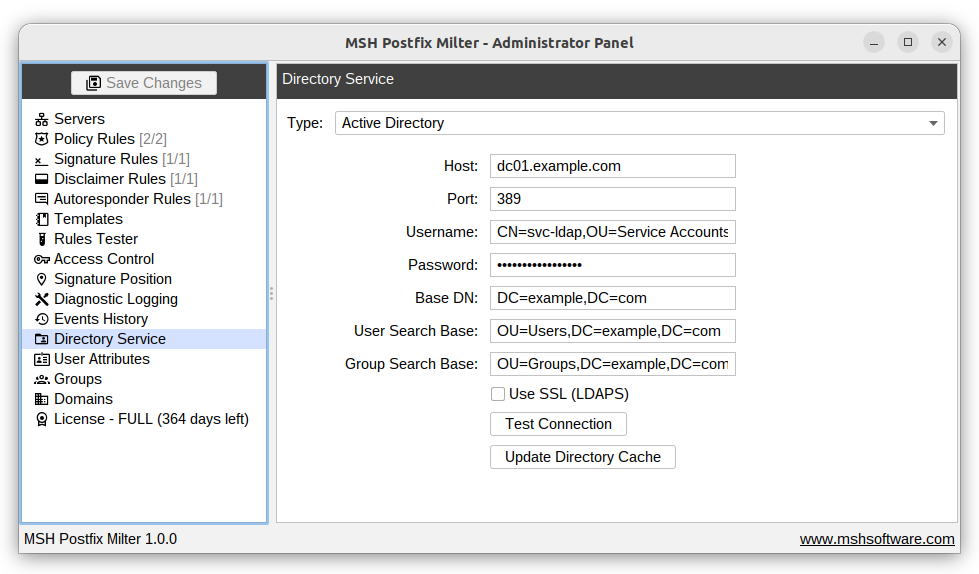
Keeping data fresh without babysitting it
Once connected, Active Directory and OpenLDAP sources refresh automatically twice a day, at midnight and noon, so attribute changes made in the directory show up in signatures without anyone touching the milter. A “Update Directory Cache” button is available when you need the latest data right away instead of waiting for the next sync window.
If you would rather not connect a live directory, a manual import mode accepts CSV files for users and groups, with example files provided as a template for the expected format. Note that Zimbra LDAP is not supported, since its schema differs from standard OpenLDAP.
To learn more visit MSH Postfix Milter website.