Redirect email to another address
We have ended support and sales of MSH Postfix Autoresponder. We recommend migrating to our new and actively maintained solution - a modern Postfix milter built on years of experience with this product.
Visit www.postfix-milter.com →Milter autoresponder which integrates with mail servers. Set common support auto responses, marketing campaigns, vacation auto replies or out of office messages. Auto-replies triggered based on message sender, recipients, headers and time range.
Setup message forwarding
After making an auto reply rule it’s a good idea to define email forwarding. The original message could be redirected to a technician who is processing support cases, or to the boss’s assistant.
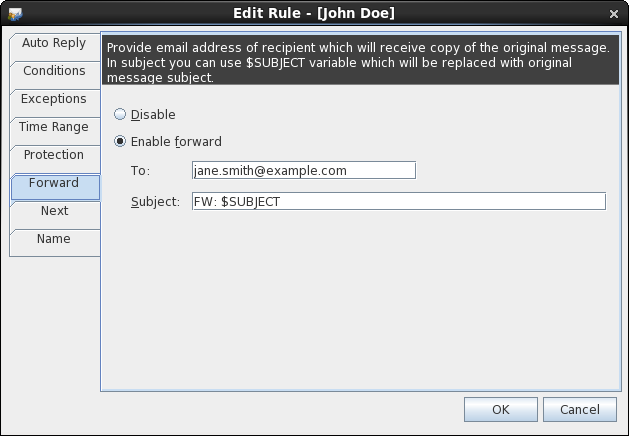
Specify email address of recipient which will receive original message. Optionally define new subject of forwarded message.
Use $SUBJECT variable which will be replaced before sending forward with original message subject.
LDAP, Loop Protection
Prevent creating loops between servers by using the built-in loop protector. Integrate with LDAP directory service and use dynamic variables inside auto replies.
To learn more visit MSH Postfix Autoresponder website.