Moving From MSH Traffic Policy, Disclaimer & Signatures or Autoresponder
Many Postfix servers still run MSH Traffic Policy, MSH Disclaimer & Signatures or MSH Autoresponder, often with years of rules built up one request at a time. Those rules are the reason a move gets postponed: nobody wants to type them in again, and nobody remembers why each one is there. MSH Postfix Milter replaces all three applications, and since version 1.2 it brings their settings across in one step.
One import per application
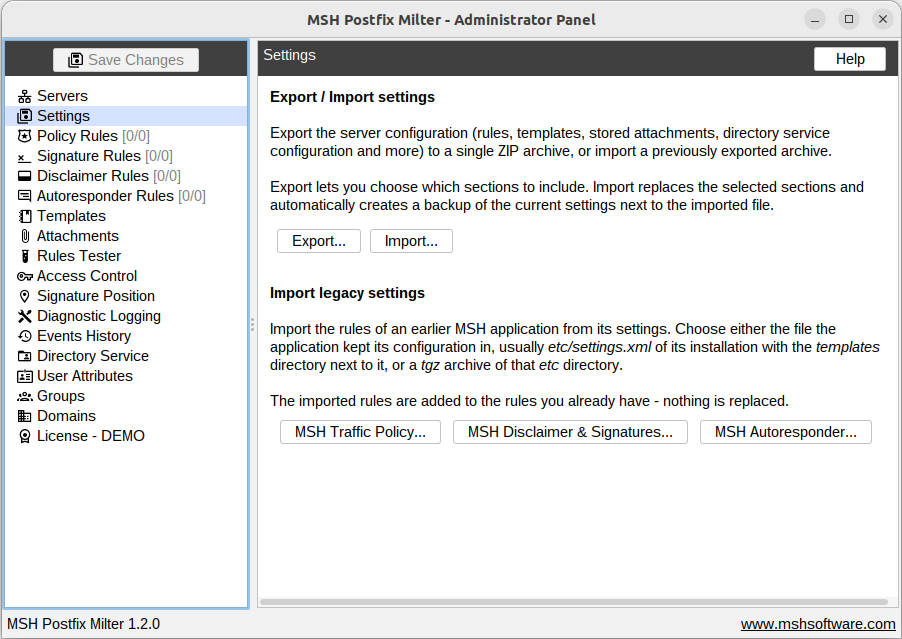
The Settings panel has an Import legacy settings section with one button for each of
the three applications. It reads the old settings.xml with its templates, or a tgz archive of
the application’s whole etc directory, so the files can be packed on the mail server and
imported from your desktop. Imported rules are added to the rules you already have. Nothing is
replaced, so you can bring Traffic Policy and Autoresponder rules into the same server one after
the other.
What changes on the way
Every condition and action of the three applications comes across, including the ones whose shape changed since. The rest is translated rather than copied:
- Variables are rewritten into the current syntax.
${message:subject}from the advanced variables of Traffic Policy becomes{message:subject}, and a directory attribute such as${ldap:HomePhone}, read through the directory integration of Disclaimer & Signatures, becomes the user attribute that holds it,{homePhone}. - A time range condition becomes the rule’s schedule.
- Autoresponder replies written inline become templates of their own, named after their rule, and loop protection keeps its settings.
A report instead of guesswork
The import ends with a report: how many rules and templates arrived, and a Not imported list of everything that did not. An autoresponder forward, for example, has to be recreated as a policy rule with the Forward message action, and a directory attribute with no matching user attribute stays as it was until you replace it. You know exactly what to check, instead of comparing two configurations line by line.
Read more in the Import legacy settings documentation and the Prepare a legacy settings archive guide.
To learn more visit MSH Postfix Milter website.