Stop Dangerous Attachments Before They Reach a Mailbox
A lot of malware still arrives the old way: an “invoice” that is really a program, a script dressed up as a document, a spreadsheet that asks to enable macros. Nobody in a company needs to receive programs by email, and every one that reaches a mailbox is one click away from a bad day. The safest place to stop them is the Zimbra server, before the message is delivered.
Refuse programs at the door
A policy rule in MSH Zimbra Rules looks at each message as it passes through Zimbra’s Postfix. The
Attachment name condition matches file names with wildcards or a regular expression, such as
*.exe, or .*\.(exe|bat|cmd|scr|js|vbs)$ for a whole family at once, and the Attachment type
condition matches content types. With the Block message action, such a message is refused
during the SMTP conversation.
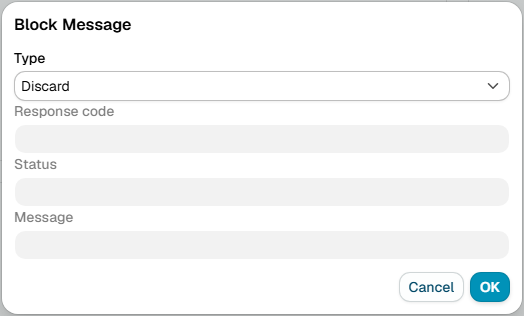
How it is refused is up to you. Reject returns a permanent error, so the sending server tells
its user the message did not arrive. A custom reply sets your own code and text, for example
550 5.7.1 with a sentence that says programs are not accepted by email. Discard accepts the
message and drops it silently, which is rarely what you want for a mistake made by a real sender.
Remove only what is risky
Not every risky attachment means the whole message is unwanted. A colleague’s spreadsheet with macros is usually sent in good faith. Remove attachments by name or by type takes out just those files and delivers the rest, and Modify subject can add a tag so the reader knows something was removed.
Without a direction condition, the rules guard incoming, outgoing and internal mail alike: an infected laptop inside the company is as much of a risk as a stranger. The Rules Tester shows what each rule does to a test message with an attachment before the rules go live.
Read more in the Block message documentation and the Block risky attachments in Zimbra: programs, archives and Office macros article.
To learn more visit MSH Zimbra Rules website.