One Administrator Panel for Every Zimbra Server
A Zimbra installation that has grown past one server usually has several MTAs, and every one of them must apply the same signatures, disclaimers and policies. Keeping separate copies of the rules in step by hand is how a disclaimer goes missing on half of the outgoing mail, and nobody notices until a customer asks.
Edit once, applied everywhere
Since version 1.2, MSH Zimbra Rules has one administrator panel for the whole installation. With several MTAs, the panel runs on a server of its own, and every MTA runs two small services: the milter that applies the rules, and a node that receives the rules and settings from the panel over HTTPS. A change is made once and reaches every MTA on its own, usually within a minute.
The design is deliberately one-way. The panel connects to the MTAs, never the other way round, and each MTA keeps a local copy of what it received. When the panel is stopped for an update, or the network between them fails, mail keeps flowing through the rules every MTA already has.
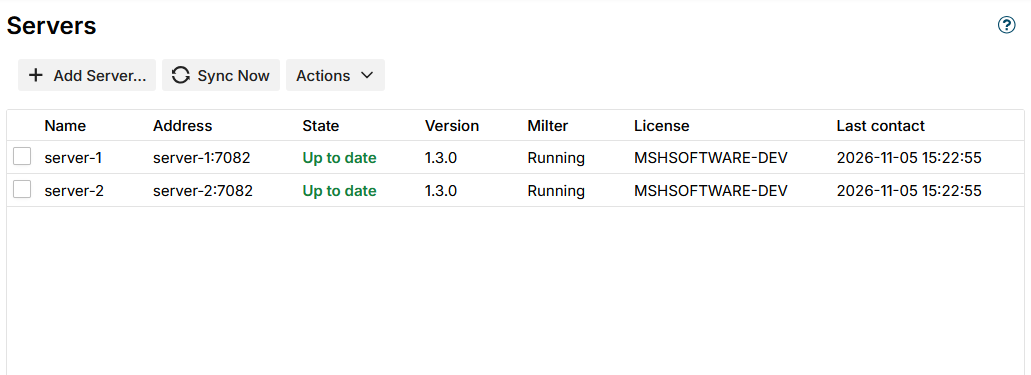
See the state of every server
The Servers page lists each MTA with its state, version, milter status and last contact. Up to date means it has the current rules. Offline, Token refused or Version mismatch says exactly what to look at. A server is added with a token from that server, and its certificate is remembered, so the panel only ever sends rules to the machine it was introduced to.
Counted and logged as one
Message count conditions and autoresponder loop protection count the messages of all servers together, so a sender cannot pass a limit by spreading mail across MTAs. Message History lists the messages of every server in one place. A single Zimbra server needs none of this set up: the panel adds it by itself as This server.
Read more in the Servers and Deployment layouts documentation.
To learn more visit MSH Zimbra Rules website.